


Game info
Virtual pet, Simulation
Care for Tom in My Talking Tom: explore feeding, rest, talking responses, mini-games, outfits, furniture and the official app.
About My Talking Tom
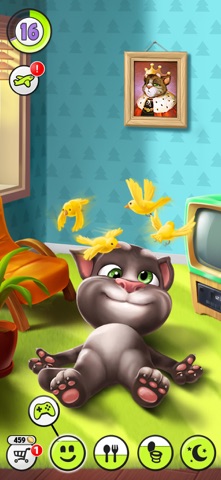
My Talking Tom turns the familiar talking cat into a virtual pet you look after over repeated visits. Food, rest, play and personal style give each session a different purpose: feed Tom when he is hungry, settle him down when he is tired, then spend time on the activities you enjoy. The main goal is to keep your pet happy while making his home and appearance feel like your own. The official My Talking Tom page introduces Outfit7's pet-care game and its supported downloads.
The game connects an ordinary care routine with playful rewards: Tom talks, clothing and furniture add a personal touch, and mini-games provide a separate challenge. Travel destinations and photo albums add further things to discover in the app. Begin with a practical goal, such as finishing Tom's care before trying a new outfit, instead of opening every menu at once. Each visit can be short, but it feels more satisfying when you know what you wanted to accomplish.
Pet Care in My Talking Tom
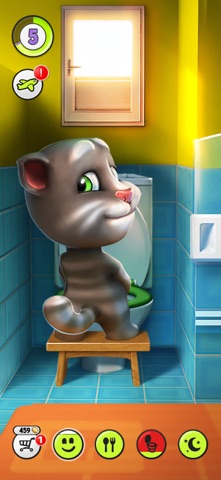
My Talking Tom's care routine starts with the needs shown around your pet. Choose the activity connected with a need, complete its visible action and return to Tom before deciding what to do next. Feeding and resting are different jobs from playing a mini-game or browsing clothing, so use the part of the home that matches the task you want to finish.

For example, handle food before settling down to compare outfits. You can then make a clothing choice without leaving a care action halfway through. On a short visit, satisfying one need is a sensible finishing point. On a longer visit, complete the care loop, choose one mini-game and then spend time on a room or fashion decision. That order leaves room for both looking after Tom and choosing an activity for yourself.
Gameplay Overview: How to Play
In the official My Talking Tom app, use a short care-and-play routine:
- Look at Tom's current need indicators and choose the room or activity connected with the need that requires attention.
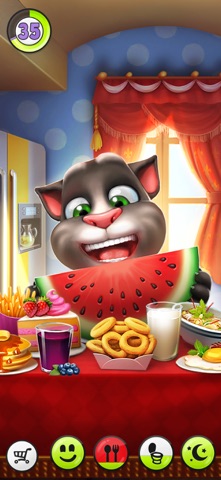
- Feed him when he needs food, and use the rest activity when he is tired instead of expecting a mini-game to replace those tasks.
- Spend part of the visit playing with Tom or trying a mini-game.
- Return to the pet screen before choosing an outfit, furniture item or the next activity.
For example, finish a feeding interaction before opening the wardrobe. You can then compare the full outfit without leaving an immediate care task halfway through. On a shorter visit, completing one need is a sensible finishing point. On a longer visit, the care routine leaves room for a mini-game attempt or a room change rather than turning every available icon into an obligation.
Gameplay Overview: Controls
My Talking Tom uses direct touch interaction. Tap a room or activity to select it, choose the item you want and use the gesture shown for that action. A deliberate tap is useful for a button; a steady drag is useful when an object must be moved. Care rooms, the clothing menu and individual mini-games can each use their own interactions, so learn the action associated with the current task rather than tapping every part of the display.
For the talking feature, check the device volume and the game's sound settings first. Recording a response requires an available microphone and any permission requested by the app. Use a short phrase, leave a pause and listen to Tom before making another recording. Background television or several voices talking at once can make the response harder to recognise. Keep the volume comfortable instead of repeatedly increasing it while the microphone is listening.
Gameplay Overview: Pro Tips
Make each My Talking Tom session follow a short care-and-play loop. Check needs, complete the next care action, then choose a mini-game or cosmetic decision. This keeps an optional activity from obscuring the reason you opened the app. If you have only a few minutes, finishing one need is a clearer stopping point than entering several menus and leaving them unfinished.
When a purchase or reward screen appears, read its label before confirming. An item paid for with collected game currency is a different decision from an offer involving real money. Keep a desired outfit or room item in mind so you can judge whether an optional purchase fits that plan. For the actual payment and advertising disclosures, use Outfit7's My Talking Tom Google Play listing, rather than assuming that every free-to-start activity has identical terms.
Key Features of the Official App
The official My Talking Tom app combines a talking pet with collectible clothing, furniture, mini-games and travel-related activities. These features answer different player interests: care makes Tom feel like a continuing companion, customisation changes how he and his surroundings look, and mini-games offer a separate challenge. Pick the part you want to work on before spending resources, because a decorative item does not serve the same purpose as completing a care action.
For a practical first objective, give Tom a recognisable look and keep his immediate needs under control. A single outfit theme is enough: choose a main colour, compare the complete outfit, and leave room to change it later. The official iPhone and iPad listing is the place to check platform requirements and the current app description when checking the supported Apple product.
Mini-Games and Changes of Pace
Treat a My Talking Tom mini-game as its own small game. Look for the immediate goal, the input and the failure condition before chasing a high score. If an activity asks for timed taps, concentrate on the next required tap rather than repeatedly pressing the screen. If it involves steering or avoiding obstacles, watch the route ahead instead of staring only at the character.
Use short attempts to learn one pattern. For example, compare an early, middle and late tap at the same obstacle, then keep the timing that produces the clearest response. A result you can repeat is more useful than a lucky long run you cannot explain. Return to the pet screen between attempts when you want to check Tom's care needs or change to a calmer activity.
Choosing a Session Style
A care session, a customisation session and a score session ask for different decisions in My Talking Tom. For care, finish the need you came to address. For customisation, settle on an outfit or room idea. For a mini-game, practise one repeated mistake or work towards a better attempt. Deciding which kind of session you want stops a short visit from turning into aimless menu switching.
You can change the pace deliberately. Finish a busy tapping activity, then compare a clothing choice or return to the pet. When resuming after a break, begin with Tom's needs before continuing an optional activity. A reward screen, a furniture choice and a care room have different purposes, so let the next decision follow the goal of the visit rather than simply pressing the last button you remember.
Clothing, Furniture and Personal Style
For Tom's outfit, choose the largest visual elements first. A bold hat can dominate the face, while a strong shirt colour can make smaller accessories harder to notice. Compare the full character after each substantial change. If several pieces compete for attention, remove one accessory before replacing the entire outfit. This gives you a more useful comparison and can preserve the part of the design you already like.
Apply the same idea to furniture. Decide whether the room should feel bright, cosy or playful, then judge a new item against the surrounding colours. A consistent room is often more satisfying than a collection of unrelated favourites. Keep a screenshot of a look you particularly enjoy before experimenting; it records the appearance without depending on whether you remember every clothing or furniture choice later.
The Talking Feature and Sound
Tom's talking response works best when the phrase is easy to hear. Begin with a short sentence, leave a pause and listen before trying a longer recording. Background television, music or several people speaking at once can make it harder to recognise the response. Keep the device volume comfortable rather than repeatedly increasing it while the microphone is listening.
For questions about the app's sound behaviour, supported devices or permissions, use Talking Tom & Friends support. Describe the product and device when asking for help. Keep a microphone problem separate from a muted speaker: one affects the sound recorded by the game, while the other affects what you hear afterwards. The more precisely you identify the action that failed, the more useful the report will be.
Advanced Tips: Make a Routine You Can Read
Watch the order of events in a care routine. Suppose you enter a room, choose food and then immediately leave for a mini-game. If you are unsure whether feeding finished, repeat the routine more slowly and wait for the clear completion cue. The useful question is which action changed Tom's state. Once that connection is clear, you can complete the routine quickly without guessing.
For a longer pet-care visit, alternate attention and choice. Complete the action Tom currently needs, then choose one activity for yourself: a mini-game attempt, a room change or an outfit comparison. This balances the simulation's needs with the creative part of play. You do not need to keep every optional activity open at once to make progress or enjoy spending time with the cat.
Similar Games: Care, Styling or Running
Choose a similar Talking Tom title by what you want to do next. My Talking Angela offers a different character focus for virtual-pet styling, while My Talking Tom Friends centres on a larger cast. Talking Tom Gold Run and Talking Tom Hero Dash use running challenges rather than a pet-care routine. Outfit7's official game catalogue provides product information for those franchise titles.
The familiar characters can lead to very different activities. A pet-care game asks you to balance needs and personal choices; a runner asks for obstacle timing; a picture-search activity rewards patient observation. Choose the action you enjoy rather than expecting every game featuring Tom to use his home screen. The related collection below offers further activities to explore once you have finished the current pet-care session.
Browser games in this collection
- My Talking Tom Friends — A shared-house care game with several Tom characters, needs icons, household stations and a garden.
- Tom Run — A Tom-like cat runs from a farmer through lanes containing barriers, gaps and coins.
- Tom Repeats Words — A Tom reaction scene with gift buttons, character hotspots and source-described voice repetition.
- Tom Shift — A silhouette-matching challenge in which Tom changes pose to fit approaching wall openings.
- Cat Tom Loves Angela — A small scene about Tom attracting Angela’s attention with gestures and gifts.
- Tom Hospital Recovery — An injured Tom waits for examination and cleanup in an ordered cartoon treatment sequence.
My Talking Tom Activities for a Shorter Visit
For a short My Talking Tom visit, choose one part of the main game with a visible result. Satisfy a need, finish a mini-game attempt, settle on an outfit or choose a furniture item for a room. A clear finish lets you enjoy the result without treating every available activity as something you must complete before closing the game.
Use the next visit to continue a different part of the routine. You might practise a mini-game after caring for Tom, then return later to collect a personal touch for his surroundings. Keeping these tasks separate makes them easier to enjoy: the care loop gives the pet continuity, the mini-games provide a challenge and customisation makes Tom and his home more recognisable.
History and Updates
My Talking Tom is part of Outfit7's Talking Tom & Friends series. It expands the talking-cat idea into a continuing virtual-pet game with care, personalisation and optional activities. The character's reactions connect those systems, whether you are spending time on an everyday need or returning from a mini-game.
For changes to the app, use the official store listing and Outfit7's support pages. Update information can help explain a changed item, menu or device requirement. Keep an important appearance as a visual reference before changing an installation, and identify the exact product name when asking for help. My Talking Tom, My Talking Tom 2 and My Talking Tom Friends are separate franchise titles with their own product information.
Plan Your Next Visit
Begin your next My Talking Tom visit with the pet, then choose what you want to enjoy. Finish feeding or resting, try a mini-game and make one clothing or room choice when you are ready for a quieter activity. A short routine gives the visit a useful shape without turning a playful pet game into a long checklist.
Choose a specific next step: settle on an outfit colour, learn a mini-game pattern, finish a care task or hear a talking response. Each gives the session a clear purpose while leaving another enjoyable activity to return to later. The continuity comes from caring for Tom and recognising how you have made his surroundings your own.
Frequently asked questions
What do you do in My Talking Tom?
Adopt and care for Tom, respond to his needs, play mini-games and personalise his clothing and surroundings. The game also includes talking responses, travel-related activities and photo albums.
How do I begin caring for Tom?
Read his need indicators, select the matching activity and complete it before returning to the pet screen. Handle a clear care need before spending a longer visit on clothing or furniture.
How do I control My Talking Tom?
Use touch selection for rooms, activities and items, and follow the gesture associated with the action. A button selection, an object movement and an individual mini-game can require different inputs.
What is a useful short My Talking Tom routine?
Finish one need, choose a mini-game or character interaction, then make one personal choice such as an outfit or room item. A specific goal makes the visit easier to finish than opening every menu.
Where can I find the official My Talking Tom app?
Use Outfit7's product page or the official App Store and Google Play listings. Confirm the name My Talking Tom when choosing between the different Talking Tom franchise titles.
What should I check if Tom's talking response does not work?
Check device volume, app sound settings and any microphone permission needed for recording. Use a short phrase in a quiet setting, and contact Talking Tom & Friends support for an app-specific issue.

Good game? Tell us.0
Share a tip, celebrate a high score, or tell us what you think. Keep it friendly.